Persistent Data Tags
Persistent data tags (also called PDC, short for persistent data container) are a way to store custom data directly on players, entities, items, blocks, chunks, and worlds. Unlike variables, which are stored separately from the game itself, persistent data tags are a part of the object they’re attached to.
What are Persistent Data Tags?
Section titled “What are Persistent Data Tags?”Think of persistent data tags as sticky notes attached directly to a game object. Stick a number on a sword, and that sword will always carry that number. Even if you move it between inventories, drop it on the ground, or pick it back up, it will always have the number available. This makes PDC tags specifically useful for item data, since items generally do not have unique identifiers you can use to access data in traditional Skript variables.
Here are some things you might use persistent data tags for:
- Custom item stats, like damage bonuses or charge levels
- Marking entities as part of a custom mob AI system
- Storing flags on chunks or worlds for game state
Every persistent data tag needs a name, called a key. Keys follow a namespaced format:
namespace:key-nameBoth the namespace and key name can only contain lowercase letters (a-z), digits (0-9), underscores (_), hyphens (-), periods (.), and forward slashes (/).
Uppercase letters will be automatically converted to lowercase for you.
"myserver:custom_damage" # good"acmeplugin:jump/boost" # good"MY-KEY" # ok, uppercase not allowed but automatically converted for you"hello world" # bad, spaces not allowedGetting and Setting Tags
Section titled “Getting and Setting Tags”The core syntax is the data tag "test" of {something}:
[the] [persistent] [%classinfo%] [list] data (value|tag) %string% of %objects%%objects%'[s] [persistent] [%classinfo%] data (value|tag) %string%Some basic uses of the singular form:
# setting a tagset data tag "myserver:level" of player to 5
# getting a tagset {_level} to data tag "myserver:level" of player
# checking if a tag existsif data tag "myserver:level" of player is set:    send "Your level is %{_level}%!" to player
# deleting a tagdelete data tag "myserver:level" of player
You can also use the possessive form:
set {_level} to player's data tag "myserver:level"Here’s a simple example of storing a damage bonus on a sword:
command /enchant-sword:    trigger:        set data tag "myserver:damage_bonus" of player's tool to 10        send "Your sword has been enchanted with a damage bonus!"
on damage:    set {_bonus} to data tag "myserver:damage_bonus" of attacker's tool    if {_bonus} is set:        add {_bonus} to damage
Specifying Types
Section titled “Specifying Types”By default, Skript figures out the type of a tag automatically. When writing a tag, it infers the type from the value. When reading a tag, it tries each compatible type until it finds one that matches.
For most use cases, this works fine without any extra effort:
set data tag "myserver:kills" of player to 42set {_kills} to data tag "myserver:kills" of playerHowever, you can add a specific type before data tag to be explicit:
set {_kills} to number data tag "myserver:kills" of playerWhen a specific type is provided, Skript will only return a value if the stored tag matches that exact type, otherwise it returns nothing. This is most useful when you want to safely distinguish between different stored types, or if you want Skript to know for certain what type the tag will be returning.
on shoot:    # only read the tag if it's actually a number    set {_strength} to number data tag "myserver:strength" of shooter's tool    if {_strength} is set:        set number data tag "myserver:damage" of projectile to {_strength}
on damage:    set {_damage} to number data tag "myserver:damage" of projectile    if {_damage} is set:        set damage to {_damage}
Storing Lists
Section titled “Storing Lists”You can store a list of values using the list modifier before data tag:
# store a listset list data tag "myserver:pets" of player to {pets::%uuid of player%::*}
# retrieve a listset {_pets::*} to list data tag "myserver:pets" of player
The list modifier can be combined with a specified type:
set {_scores::*} to number list data tag "myserver:scores" of playerYou can also omit list and instead make the specified type plural:
set {_scores::*} to numbers data tag "myserver:scores" of playerSupported Types
Section titled “Supported Types”PDC natively handles numbers and text. Beyond that, any Skript type that can be saved in a variable can also be stored in a persistent data tag, so, locations, items, offline players, and more are all valid types. Transient types like inventories and entities are not valid.
# numbersset data tag "myserver:kills" of player to 42
# textset data tag "myserver:rank" of player to "veteran"
# itemsset data tag "myserver:reward-item" of player to a diamond sword named "Prize"
# offline players (e.g. storing who created a mob)set data tag "myserver:owner" of last spawned entity to player
Full Example
Section titled “Full Example”Here’s a complete script using persistent data tags to implement a jump-boost item:
# Give the player the bootscommand /give-springboots:    trigger:        give player leather boots named "Spring Boots"        set data tag "myserver:spring_boost" of player's tool to true        send "Equip these boots and jump to launch yourself upward!"
# Apply the boost on jumpon jump:    if data tag "myserver:spring_boost" of player's boots is set:        push player upwards with force 1.5
And a slightly more involved example — a custom bow that deals bonus damage based on a tag set on the bow:
# Give the player a bow with extra damagecommand /give-powerbow:    trigger:        set {_bow} to bow named "&6Power Bow" with lore "&4This bow fires arrows that deal serious damage."        set number data tag "myserver:arrow_damage" of {_bow} to 8        give {_bow} to player
# When the player shoots, copy the damage tag onto the arrowon shoot:    set {_bonus} to number data tag "myserver:arrow_damage" of shooter's tool    if {_bonus} is set:        set number data tag "myserver:arrow_damage" of projectile to {_bonus}
# When the arrow hits, apply the bonus damageon damage:    if victim is a living entity:        set {_bonus} to number data tag "myserver:arrow_damage" of projectile        if {_bonus} is set:            add {_bonus} to damage
Viewing Tags with /data
Section titled “Viewing Tags with /data”Persistent data tags show up in Minecraft’s /data command, which is useful for debugging.
Entities and Players
Section titled “Entities and Players”Run /data get entity <player-name> and look for BukkitValues:
/data get entity Steve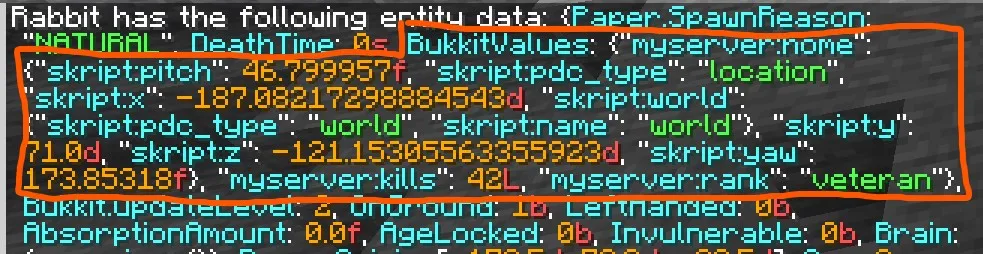 Simple types like numbers and strings appear directly under
 BukkitValues:
{BukkitValues: {"myserver:kills": 42L, "myserver:rank": "veteran"}}for the item currently in your hand:
/data get entity @s SelectedItemItems store their PDC inside a minecraft:custom_data component, which holds a PublicBukkitValues compound:
{id: "minecraft:diamond_sword", components: {"minecraft:custom_data": {PublicBukkitValues: {"myserver:damage_bonus": 10}}}}
Blocks
Section titled “Blocks”PDC is only valid for blocks that are block entities, like chests, signs, and similar blocks.
For more inert blocks, we advise storing data on the chunk instead.

Chunks, Worlds, and others:
Section titled “Chunks, Worlds, and others:”Other PDC holders will generally fall into the same format as blocks.
Though /data cannot show the data of chunks or worlds, viewing their NBT with other tools will show a similar format.